 SIGN IN
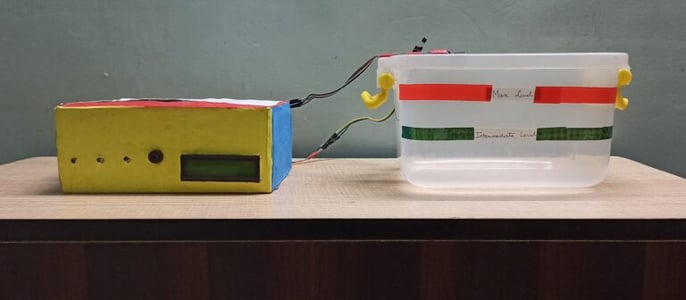
As we all know that Flood is one of the major well known Natural Disasters. When water level suddenly rises in dams, river beds etc. Alot of Destruction happens at surrounding places. It causes a huge amount of loss to our environment and living beings as well. So in these case, it is very important to get emergency alerts of the water level situation in different conditions in the river bed.
The purpose of this project is to sense the water level in river beds and check if they are in normal condition. If they reach beyond the limit, then it alerts people through LED signals and buzzer sound. Also it alerts people through Sms and Emails alerts when the water level reaches beyond the limit.
Excited? Let's get started.
For Building this project we first configure the hardware connections. Then later on moving to the software part.
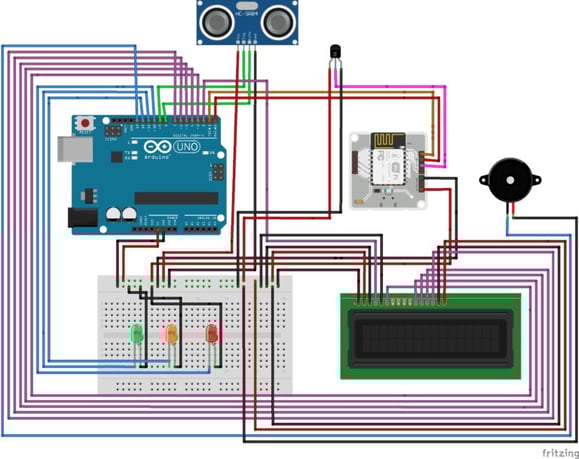
Step 1: Connecting 5v and GND of Arduino to the Breadboard for power connection to other components.
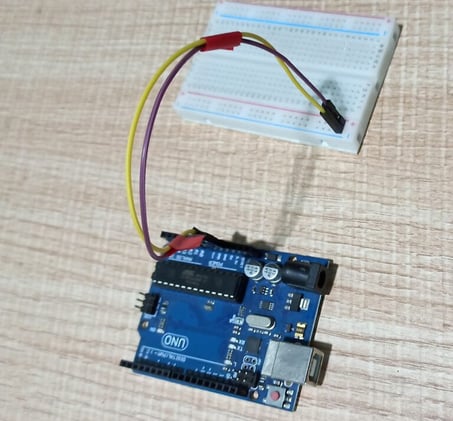
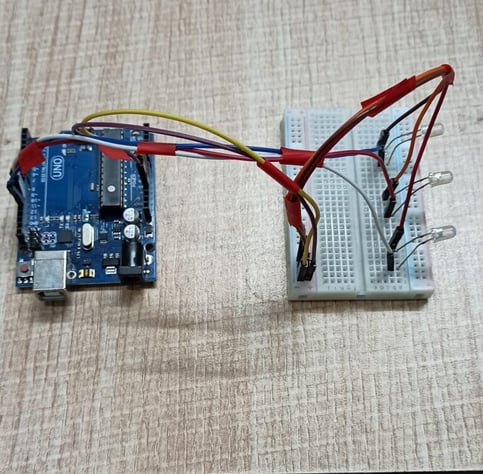
Step 2: Connecting LED’s
For Green LED:
For Orange LED:
For Red LED:
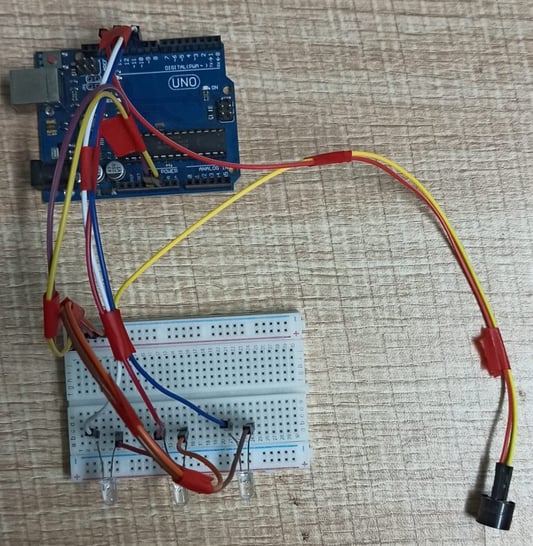
Step 3: Connecting Buzzer
Step 4: Connecting HC-SR04 Ultrasonic Sensor
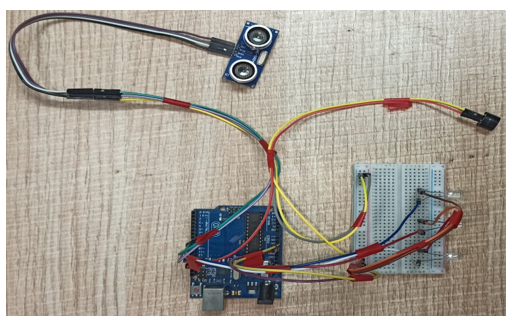
Step 5: Connecting Bolt WiFi Module
Step 6: Connecting LM35 Temperature Sensor
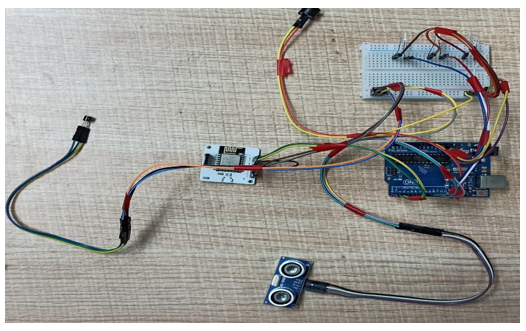
Step 7:Connecting 16×2 LCD Display
After doing the hardware connection put all the hardware components in one box.
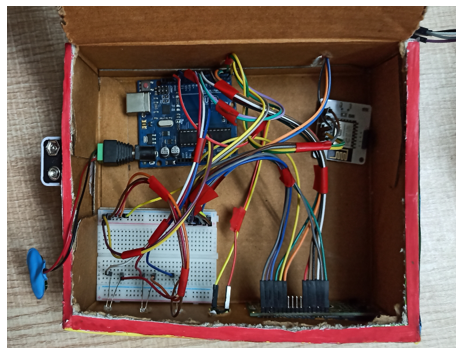
Also attach LM35 Temperature Sensor on the side of the container.
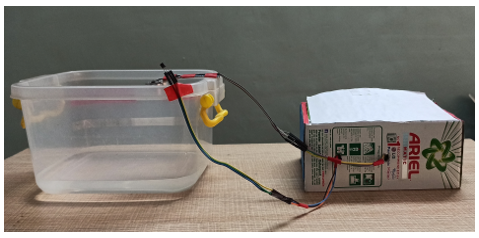
Also attach Ultrasonic sensor on the top of the container.
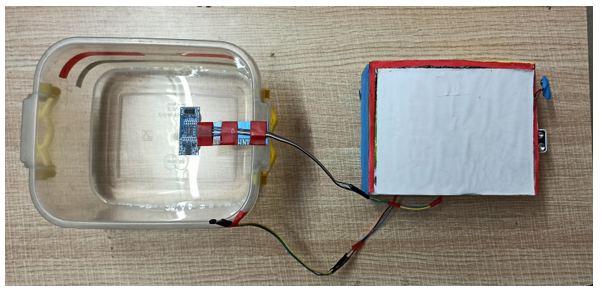
After the successful completion of hardware setup. Now it’s the time to do software setup for the project. For that you have to first Download and Install Arduino IDE and Python IDE from the link given above in the software apps and online services section. Also Creating account on various online app services and noting down the important keys and id’s. Below all the steps given to create account on online app services and noting down the keys.
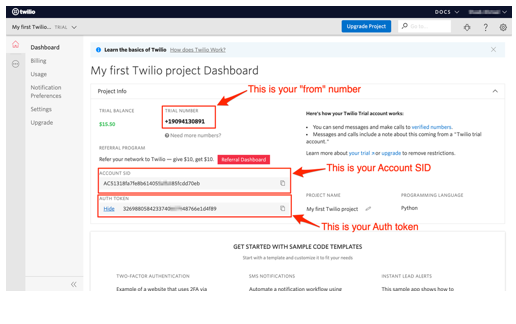
Step 1:Creating an account on Twillo and setting up Twillo for sending Sms alerts.
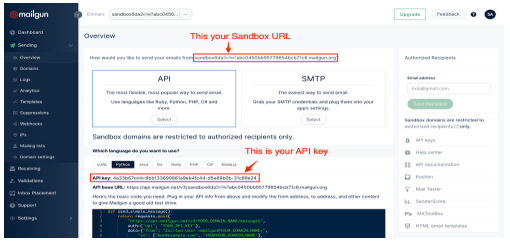
Step 2:Creating an account on Mailgun and setting up Mailgun for sending Email alerts.
Step 4:Creating an account on Bolt Cloud and Bolt Android App and Link the Bolt Module to Cloud.
Bolt Device Id
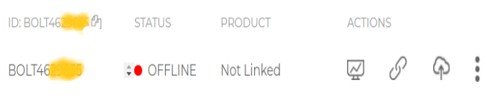
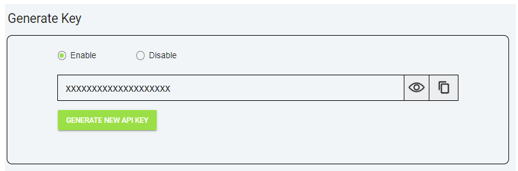
API Key
Step 5: Coding
After setting online app services and saving the keys somewhere. Now most important is to write code and allow sensors attached to microcontroller to take specific decisions.
Basically this project contains two editors to write the code. First is Arduino IDE in that we will write the arduino code. Second the Python IDE in that we will write the configuration file and the main code. Also the download link of both the editor can find above in the online app services section.
Step 5.1: Writing the code in the Arduino IDE
//IOT Based Flood Monitoring And Alerting System.
#include<LiquidCrystal.h>

LiquidCrystal lcd(2, 3, 4, 5, 6, 7);

const int in = 8;
const int out = 9;
const int green = 10;
const int orange = 11;
const int red = 12;
const int buzz = 13;

void setup() {
Serial.begin(9600);
lcd.begin(16, 2);
pinMode( in , INPUT);
pinMode(out, OUTPUT);
pinMode(green, OUTPUT);
pinMode(orange, OUTPUT);
pinMode(red, OUTPUT);
pinMode(buzz, OUTPUT);
digitalWrite(green, LOW);
digitalWrite(orange, LOW);
digitalWrite(red, LOW);
digitalWrite(buzz, LOW);
lcd.setCursor(0, 0);
lcd.print("Flood Monitoring");
lcd.setCursor(0, 1);
lcd.print("Alerting System");
delay(5000);
lcd.clear();
}

void loop() {
long dur;
long dist;
long per;
digitalWrite(out, LOW);
delayMicroseconds(2);
digitalWrite(out, HIGH);
delayMicroseconds(10);
digitalWrite(out, LOW);
dur = pulseIn( in , HIGH);
dist = (dur * 0.034) / 2;
per = map(dist, 10.5, 2, 0, 100);
#map
function is used to convert the distance into percentage.
if(per < 0) {
per = 0;
}
if (per > 100) {
per = 100;
}
Serial.println(String(per));
lcd.setCursor(0, 0);
lcd.print("Water Level:");
lcd.print(String(per));
lcd.print("% ");
if (per >= 80) #MAX Level of Water--Red Alert!{
lcd.setCursor(0, 1);
lcd.print("Red Alert! ");
digitalWrite(red, HIGH);
digitalWrite(green, LOW);
digitalWrite(orange, LOW);
digitalWrite(buzz, HIGH);
delay(2000);
digitalWrite(buzz, LOW);
delay(2000);
digitalWrite(buzz, HIGH);
delay(2000);
digitalWrite(buzz, LOW);
delay(2000);

}
else if (per >= 55) #Intermedite Level of Water--Orange Alert!{
lcd.setCursor(0, 1);
lcd.print("Orange Alert! ");
digitalWrite(orange, HIGH);
digitalWrite(red, LOW);
digitalWrite(green, LOW);
digitalWrite(buzz, HIGH);
delay(3000);
digitalWrite(buzz, LOW);
delay(3000);

}
else #MIN / NORMAL level of Water--Green Alert!{
lcd.setCursor(0, 1);
lcd.print("Green Alert! ");
digitalWrite(green, HIGH);
digitalWrite(orange, LOW);
digitalWrite(red, LOW);
digitalWrite(buzz, LOW);
}

delay(15000);
}
Step 5.2: Writing the code in Python IDE.
#twillo details for sending alert sms
SID = 'You can find SID in your Twilio Dashboard'
AUTH_TOKEN = 'You can find  on your Twilio Dashboard'
FROM_NUMBER = 'This is the no. generated by Twilio. You can find this on your Twilio Dashboard'
TO_NUMBER = 'This is your number. Make sure you are adding +91 in beginning'

#bolt iot details
API_KEY = 'XXXXXXXXX'
   #This is your Bolt cloud API
Key.
DEVICE_ID = 'BOLTXXXXXXXXX' #This is the ID of your Bolt device.

#mailgun details for sending alert E-mails
MAILGUN_API_KEY = 'This is the private API key which you can find on your Mailgun Dashboard'
SANDBOX_URL= 'You can find this on your Mailgun Dashboard'
SENDER_EMAIL = 'test@ + SANDBOX_URL' # No need to modify this. The sandbox URL is of the format test@YOUR_SANDBOX_URL
RECIPIENT_EMAIL = 'Enter your Email ID Here'
import conf
from boltiot import Sms, Email, Bolt
import json, time

intermediate_value = 55
max_value = 80


mybolt = Bolt(conf.API_KEY, conf.DEVICE_ID)
sms = Sms(conf.SID, conf.AUTH_TOKEN, conf.TO_NUMBER, conf.FROM_NUMBER)
mailer = Email(conf.MAILGUN_API_KEY, conf.SANDBOX_URL, conf.SENDER_EMAIL, conf.RECIPIENT_EMAIL)


def twillo_message(message):
  try:
     print("Making request to Twilio to send a SMS")
     response = sms.send_sms(message)
     print("Response received from Twilio is: " + str(response))
     print("Status of SMS at Twilio is :" + str(response.status))
  except Exception as e:
     print("Below are the details")
     print(e)

def mailgun_message(head,message_1):
  try:
     print("Making request to Mailgun to send an email")
     response = mailer.send_email(head,message_1)
     print("Response received from Mailgun is: " + response.text)
  except Exception as e:
     print("Below are the details")
     print(e)

while True:
    print ("Reading Water-Level Value")
    response_1 = mybolt.serialRead('10')
    response = mybolt.analogRead('A0')
    data_1 = json.loads(response_1)
    data = json.loads(response)
    Water_level = data_1['value'].rstrip()
    print("Water Level value is: " + str(Water_level) + "%")
    sensor_value = int(data['value'])
    temp = (100*sensor_value)/1024
    temp_value = round(temp,2)
    print("Temperature is: " + str(temp_value) + "°C")
    try:

        if int(Water_level) >= intermediate_value:
            message ="Orange Alert!. Water level is increased by " +str(Water_level) + "% at your place. Please be Safe. The current Temperature is " + str(temp_value) + "°C."
            head="Orange Alert"
            message_1="Water level is increased by " + str(Water_level) + "% at your place. Please be Safe. The current Temperature is " + str(temp_value) + "°C."
            twillo_message(message)
            mailgun_message(head,message_1)

        if int(Water_level) >= max_value:
           message ="Red Alert!. Water level is increased by " + str(Water_level) + "% at your place. Please Don't move out of the house. The Current Temperature is " + str(temp_value) + "°C"
           head="Red Alert!"
           message_1="Water level is increased by " + str(Water_level) + "% at your place. Please Don't move out of the house. The Current Temperature is " + str(temp_value) + "°C."
           twillo_message(message)
           mailgun_message(head,message_1)

    except Exception as e:
        print ("Error occured: Below are the details")
        print (e)
    time.sleep(15)
After Successfully writing code for Arduino and Python. Now it is the time to test and demonstrate the project. Move to next section for demonstration of the project.
Lets First have a look at the workflow of this project.
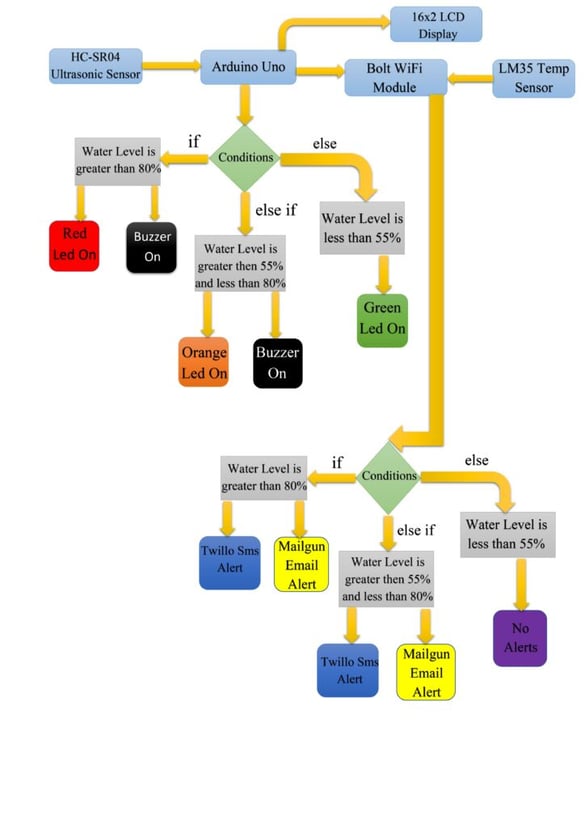
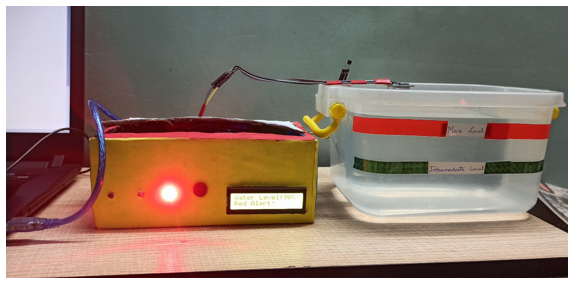
For doing the practical demonstration. First connect the USB cable type-B to the Laptop’s USB slot for power supply. Also simultaneously run the python program(i.e Main.py). Firstly the ultrasonic sensor will sense the water level in distance and then the arduino program will help to convert it into percentage. Also the sensed water level will be displayed on Lcd display(In Percentage) along with zone/area the water level is present. The full water tank/container is divided into 3 zones i.e Green, Orange and Red. Now lets look into each zone.
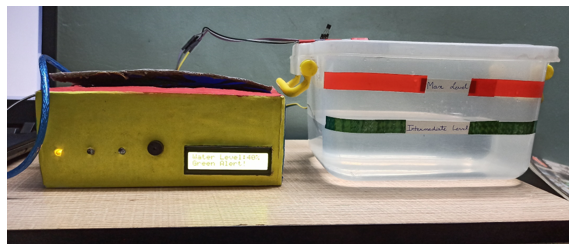
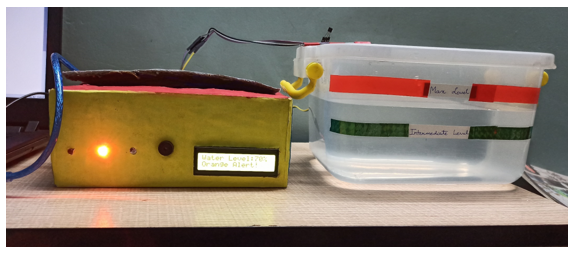
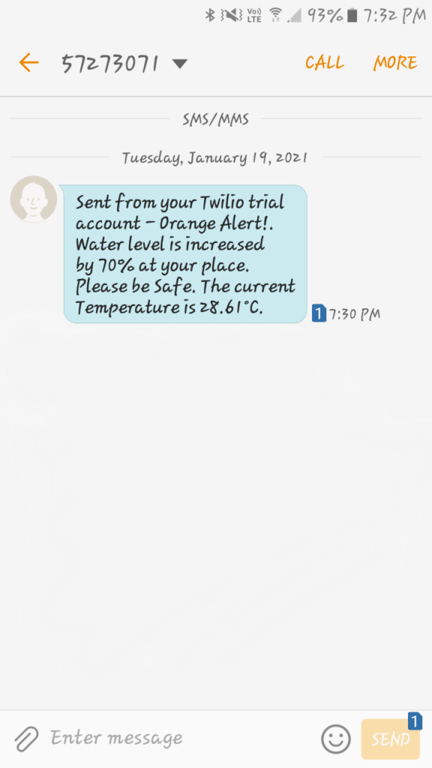
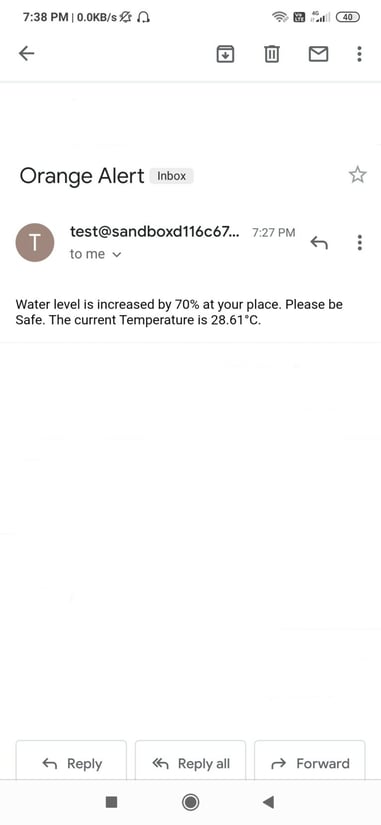
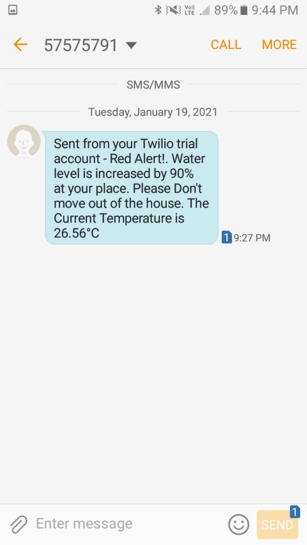
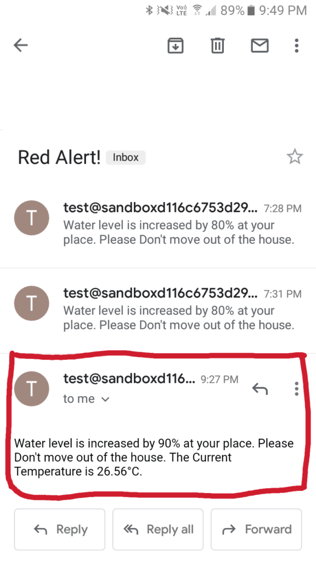
Also Sms and Email is send to registered user with proper message and current temperature of that place.
Twillo Sms Alert:
Mailgun Email Alert
Watch our project in action:
Nowadays the Internet Of things (IoT) is broadly used in worldwide, this system will display the data of the water level measured on lcd display. This project can be very helpful to the Meteorological Department to continuously monitor the dams and river beds water level. With this project it can save many people lives by giving alerts when the water level crosses beyond the limit. This project is very cost-effective, flexible and productive in areas where flood conditions happens everytime
Check out the Bolt IoT and ML training. This online video training is excellent for those who want to start with IoT and ML because it teaches you to build projects from the basics. Click on the button below to know more about the training.

Get the latest IoT tutorials, projects, and updates delivered to your inbox.